 Blake Gentry
 When we first launched River Pro workflows, the goal was to make complex job graphs easy to express as normal River jobs. A workflow could fan out, fan in, retry individual tasks, and show its progress in River UI.
That model is still the core of workflows, but many real systems need to wait on something other than another job finishing. An order may pass normal validation but still need manual fraud review. An AI analysis workflow may hand off a long-running LLM request and resume only when the asynchronous result arrives, rather than blocking a worker slot while waiting around for it. A review step may need to proceed after an SLA timeout even if nobody responded.
River Pro v0.24.0 adds first-class support for those cases with workflow signals, timers, and CEL wait conditions. To make that possible, we rebuilt the workflow engine behind the existing API. In local benchmarks, the new engine delivered about 60% higher sustained throughput, and fixed workflow backlogs drained more than 20x faster.
A new workflow engine
Signals and timers change the workflow engine’s hot path. A workflow task can now remain pending for hours or days, and the hard part at scale is not the waiting itself; it is cheaply finding the small set of workflows whose wait conditions may have changed when a task completes, a signal arrives, or a timer becomes due, without repeatedly revisiting unrelated pending work.
The original engine had to rediscover too much each time it tried to move workflows forward. That worked at small sizes, but under backlog pressure the hot path asked Postgres to keep finding the same workflow state through general job metadata instead of through storage shaped around workflows.
The rebuilt engine materializes workflow IDs and task names into trigger-maintained columns with supporting indexes, while workflow-specific storage tracks signals, attempt history, timer scheduling, and queued evaluation work. When a relevant event occurs, River can enqueue targeted workflow evaluation and process it across clients in bounded batches, keeping evaluators focused on workflows that may actually have become runnable.
Two benchmark shapes are worth separating. The cleanest comparison is sustained load. We ran both engines against the same one-minute benchmark of two-task workflows. v2 completed essentially all offered work, while v1 kept processing but could not stay caught up.
| Engine | Workflows offered | Workflows completed | Workflow/sec | Backlog after 60s | Notes |
|---|---|---|---|---|---|
| v1 | 240,000 | 148,818 | 2,480.3 | 91,482 | Encountered staging timeouts. |
| v2 | 240,000 | 239,953 | 3,999.2 | 47 | Kept up with offered load. |
That is roughly 60% higher workflow throughput in this benchmark, but the bigger point is what happened under pressure: v2 stayed caught up, while v1 turned the same workload into a large backlog.
Fixed-backlog runs showed a different operational win. Across the sizes we tested, v2 drained accumulated workflow work cleanly. v1 showed the same timeout-prone pattern repeatedly: earlier backlog runs stalled with pending work, and the completed 20k run below eventually finished only after a timeout followed by a long no-progress tail before periodic rescue recovered the remaining work.
| Engine | Fixed backlog | Drain time | Notes |
|---|---|---|---|
| v1 | 20k workflows / 40k jobs | 303.534s | Hit a timeout and recovered after a long stalled tail. |
| v2 | 20k workflows / 40k jobs | 4.760s | Drained cleanly through targeted workflow evaluation. |
The point is not that every workflow runs twenty times faster. It is that when a backlog forms, v2 can catch up directly instead of falling into the timeout-and-rescue path that made large v1 backlogs unpredictable.
Waiting without blocking workers
The most useful workflows often spend most of their lifetime waiting. A fraud review may take minutes or days. A long-running LLM request may return through an async callback after the worker that started it has moved on. A payment or fulfillment provider may retry a webhook until your endpoint accepts it. Those pauses are part of the workflow, even though no worker should be sitting around for them.
Without a workflow-native way to wait, those pauses tend to leak out of the graph. A worker can poll while it waits, but then a worker slot is tied up doing no useful work. A follow-up job can check application tables later, but then the condition being waited on is split away from the workflow. A webhook handler can stitch things together manually, but then the durable history of why the workflow moved forward lives somewhere else.
Wait conditions let the workflow own that pause. A task can wait for durable signals, timers, or a CEL expression that combines several facts. Workers only run when there is real work to do, while the reason the workflow is blocked stays durable and visible.
Here is the fraud-review case as a signal-or-timeout wait:
workflow.Add("decide_shipment", ShipmentDecisionArgs{OrderID: "ord_123"}, nil, &riverpro.WorkflowTaskOpts{ Wait: &riverworkflow.WaitSpec{ Expr: "manual_review_received || review_sla", Terms: []riverworkflow.WaitTermSpec{ riverworkflow.WaitTermSignal( "manual_review_received", // term name "manual_review", // signal key `payload.approved == true && payload.reviewer != ""`, ).Label("Manual review approved"), riverworkflow.WaitTermTimer( riverworkflow.TimerAfterWaitStarted("review_sla", 30*time.Minute), ).Label("Review SLA elapsed"), }, },})If an approved manual_review signal arrives, the shipment decision runs immediately. If no matching signal arrives within 30 minutes after the wait becomes active, the timer fires and the same task runs through the timeout path instead.
When the review UI or webhook handler records a decision, it emits the signal onto the workflow:
_, err := workflow.Signals().Emit(ctx, "manual_review", ManualReviewSignal{ Approved: true, Reviewer: "alice",}, &riverpro.WorkflowSignalEmitOpts{ IdempotencyKey: requestID, Source: map[string]any{ "request_id": requestID, "actor": "alice", },})Real callbacks retry, and operators sometimes resubmit requests. IdempotencyKey lets each logical review decision be emitted safely once, even if the same request is replayed. If the same key is reused with a different payload, River returns an error instead of silently rewriting workflow history.
Durable signals
Signals are not one-time messages consumed by whichever task sees them first; they are durable facts attached to a workflow. In the real world, this could be something like “this order passed fraud review,” “Stripe sent this webhook,” or “the customer uploaded the missing document.” More than one task can use the same fact, and the fact remains available later for audit, debugging, or workflow UI.
When a waiting task finally runs, River can expose the signal evidence that made its wait condition true. By default, a worker sees the evidence that was visible when the wait resolved, so it does not accidentally make a decision using a signal that arrived later.
Workflow timers
Time is the other half of long-lived orchestration, and it is easy to get wrong when it lives outside the workflow. A worker can sleep, but then a worker slot is occupied by doing nothing. A polling job can wake up later, but then the timeout state lives in another table and another loop of application code.
Workflow timers make the deadline part of the wait itself, with anchors flexible enough to match the process you are modeling. A wait can resolve at a fixed time, after the workflow was created, after a dependency finalized, or after the waiting task became active.
That last anchor, TimerAfterWaitStarted, is especially useful for approval flows and escalation paths. In the manual-review flow above, it starts the clock only after dependencies are complete and the task is actually waiting, so the timeout measures the time someone had to respond instead of starting before the review task could have run.
Because timers belong to the workflow engine, applications do not need polling jobs or sleeping workers to move a workflow forward. River Pro stores timer state durably, finds due timers through indexed paths, and wakes the workflow when time becomes the reason it can advance.
CEL wait conditions
Some waits are simple: a signal arrives, or a timer fires. Others need a little logic: an approval or a timeout, two matching approvals, a fraud score below a threshold, or a fallback path when an external system never responds.
Wait conditions use Common Expression Language for that logic. CEL gives workflows a safe expression language for combining declared facts, without turning the workflow into a custom polling loop or asking workers to sit around evaluating state.
The preferred pattern is to declare named terms and then combine them:
approval_received || timeout(kyc_passed && funds_captured) || manual_override- a signal term that requires two matching approval signals with
.Count(2) - a dependency-output term like
deps["score_fraud"].output.score < 90
Those declarations are the important part. They tell River Pro which signal keys, timers, and dependency outputs can affect the wait, so the engine can wake the right workflows without rechecking every waiting task for every event. They also make waits easier to validate: Prepare catches term names, timer anchors, dependency references, and CEL syntax before anything is inserted.
That split keeps the workflow readable. Go still owns the worker implementation, while CEL owns the small boolean decision that says when the worker is allowed to run.
Workflow waits in River UI
Long-running workflows are easier to trust when the UI can show why they are paused. River UI v0.16.0 brings waits into the workflow detail page: blocked tasks appear in the graph, and selecting one opens a task inspector that explains what River is waiting for.
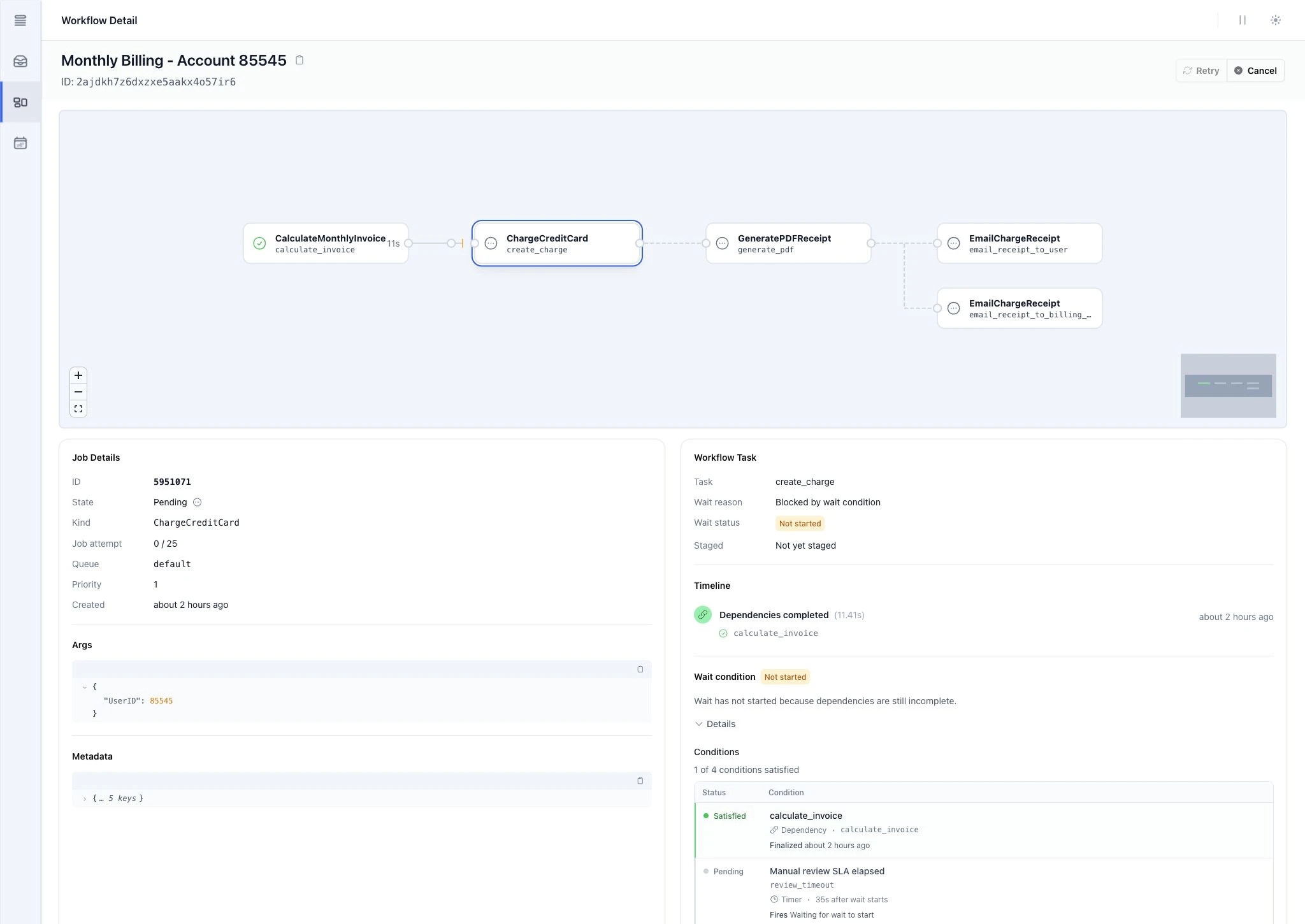
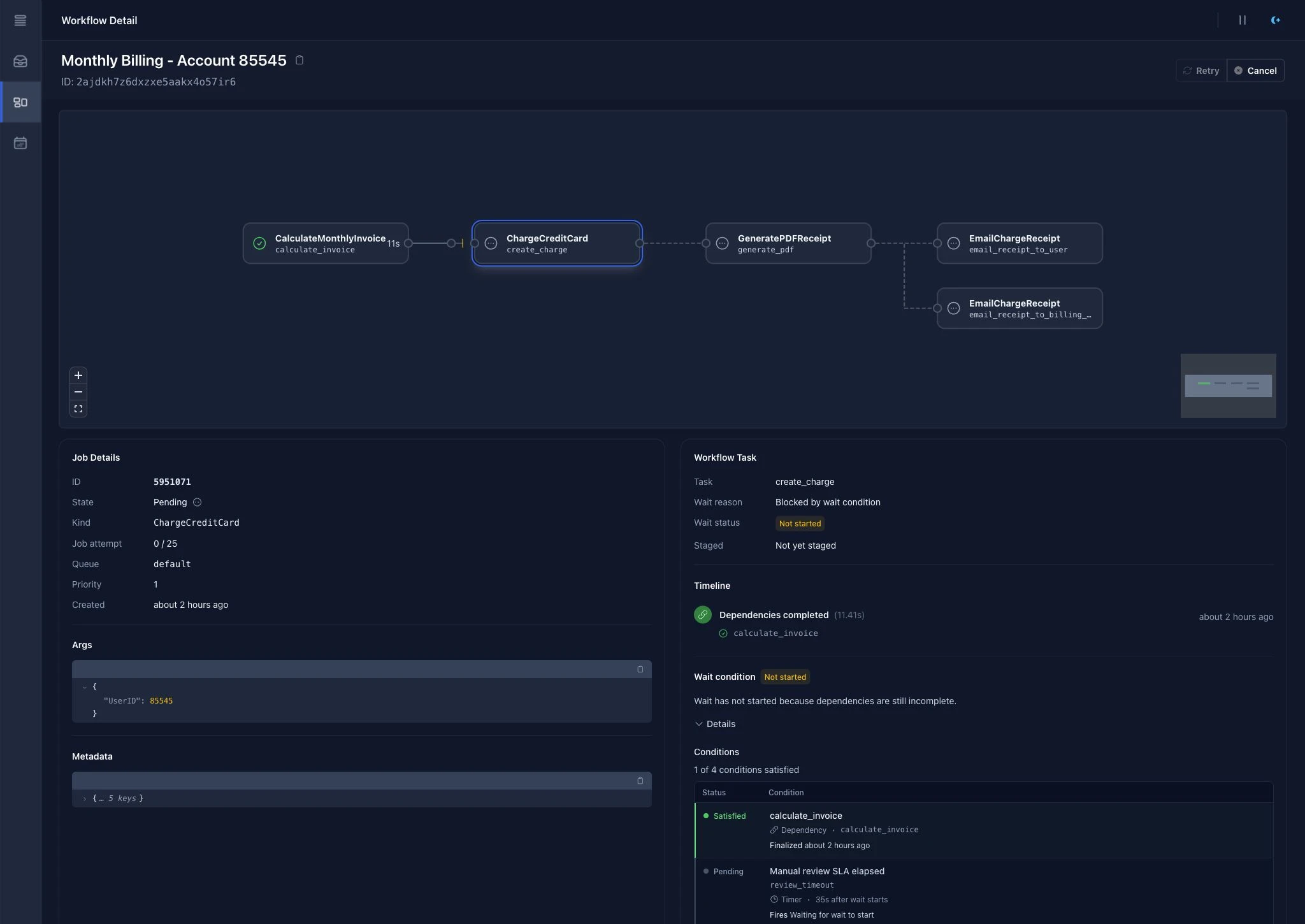
The graph answers the first operational question: where is this workflow blocked? The task panel answers the next one: what has to happen before it can move forward?
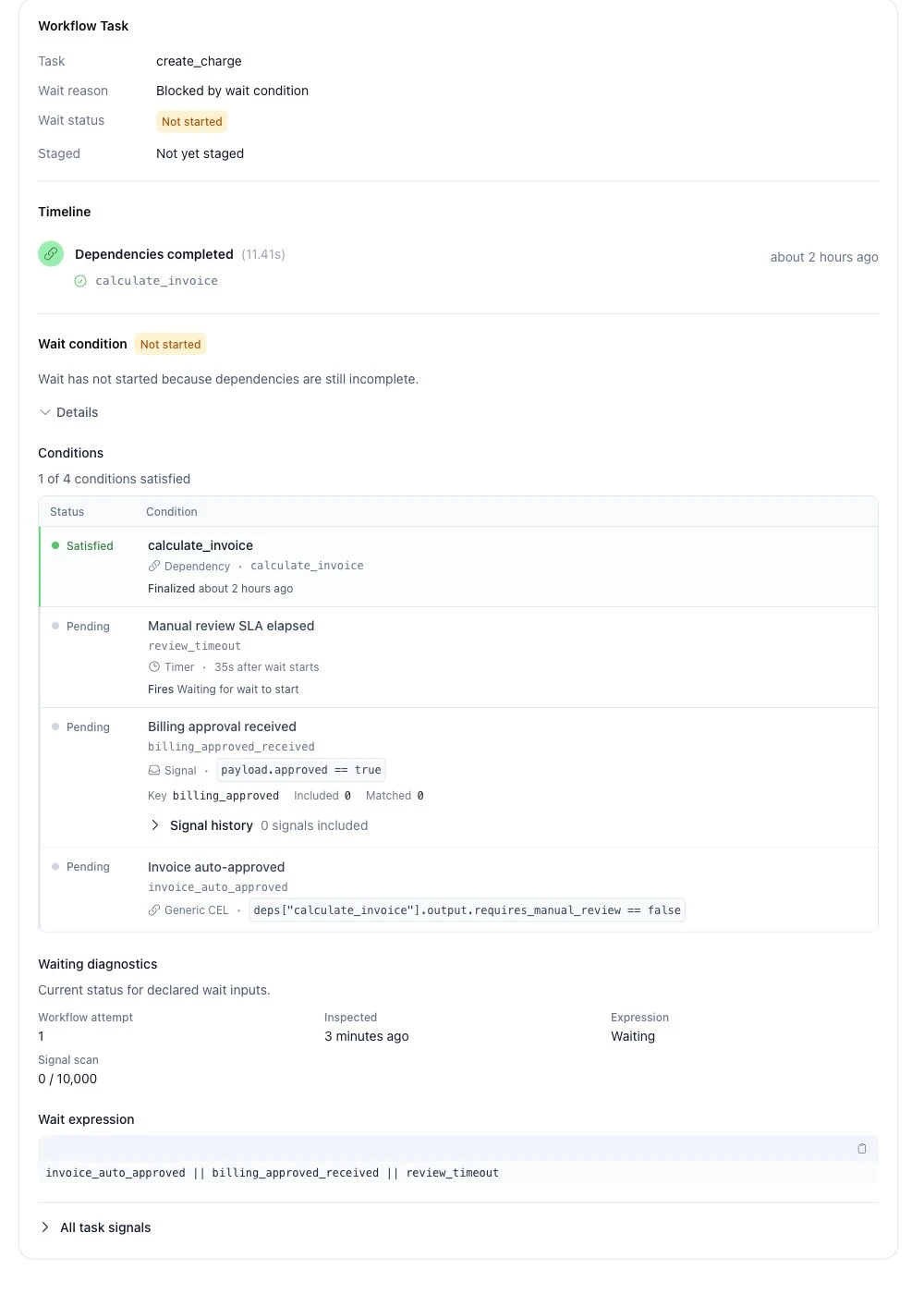
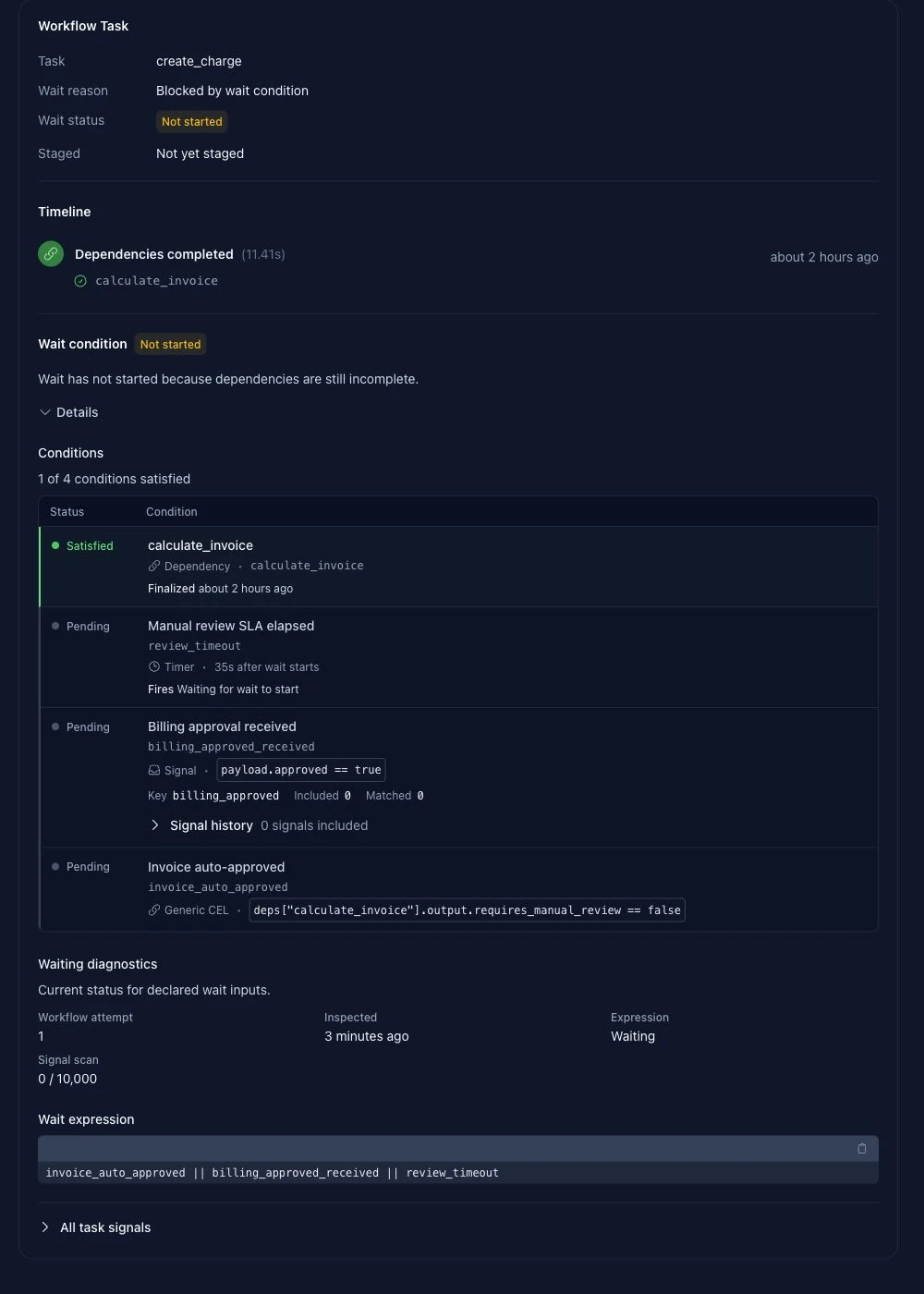
In this billing flow, the charge task is pending until one of several wait inputs changes: a CEL condition confirms the invoice can be auto-approved, a billing-approval signal arrives, or the manual-review timer fires. That turns a vague pending state into something actionable. You can see which conditions are satisfied, which are still pending, the signal and timer inputs River has checked, and the exact expression being evaluated. When the task later moves forward, the same view provides the timeline and evidence that explain why.
The same River UI release also makes workflows easier to operate day to day: better initial graph framing, on-canvas zoom controls, task-scoped signal inspection, clearer empty states, copy buttons for long workflow names, sorted JSON payloads, delete confirmations, and cleaner timelines for delayed or snoozed jobs.
Available now
Signals, timers, and CEL wait conditions are available now in River Pro v0.24.0, but upgrading does not have to start with rewriting workflows around new primitives. Existing workflow definitions keep the same job-graph API, while the v0.24.0 runtime moves them onto the rebuilt workflow engine designed to stay caught up under sustained load and avoid timeout-prone backlog tails.
From there, waits give you an incremental way to replace custom polling, worker sleeps, and hand-rolled callback wakeup logic with durable pauses inside the workflow. Bring those pauses into River when they are ready, and keep the reason for each one visible in the workflow itself.
Before upgrading production systems, read the River Pro v0.24.0 changelog for the migration sequence and large-table rollout notes. The workflow docs cover signals, timers, CEL waits, and workflow-aware retention, and the generated Go docs have the exact API.